PDF · Markdown · JSON · Video · Music
Export Gemini chats in one click
Save, backup, and share your Gemini conversations without copy-paste. Export a single chat, pick specific messages, or download multiple conversations at once—right from gemini.google.com.
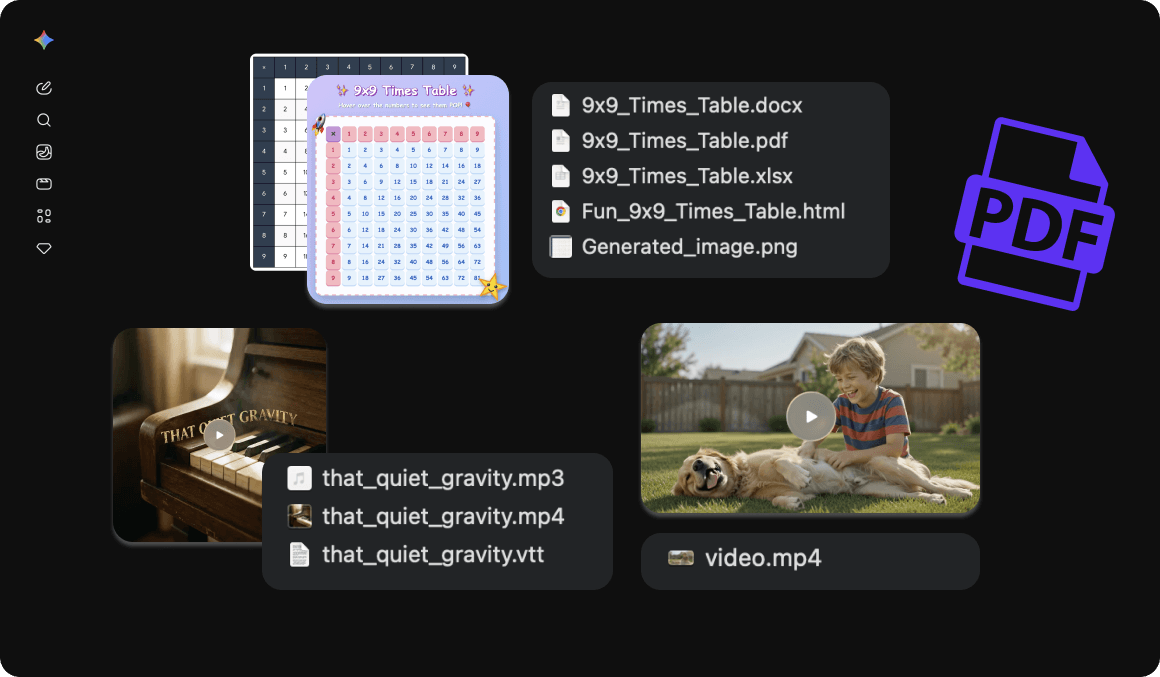
Beyond plain text—export video, music, images, and HTML alongside your chat. Built for researchers, writers, developers, and teams who need clean, portable archives.
Built for real Gemini workflows
Keep local backups, move chats into your notes app, and export rich media—video, music, images, and HTML—without leaving Gemini.
Export this chat
One click to download the current Gemini conversation in your preferred format—right from the page you are already on.
Select messages
Choose only the messages you need. Skip the noise and export the useful parts with All, Questions, Answers, or Invert shortcuts.
Bulk conversation export
Backup multiple Gemini chats at once as a ZIP archive. Perfect for regular archives, project handoffs, and long-term research storage.
Six clean export formats
Markdown for Notion and Obsidian, PDF for sharing, JSON for developers, CSV for spreadsheets, plus HTML and plain TXT.
On-page export button
A floating export button on Gemini—drag to reposition anytime. Export without leaving the conversation.
Rich media exports
Export video, music, images, and HTML alongside your chat. Music downloads include album art and VTT subtitles automatically.
Rich text & attachments
Generated images at higher resolution with prompts, plus file attachments—PDF, DOCX, XLSX, HTML, and more. Canvas and immersive HTML outputs are preserved.
ZIP with assets folder
Bulk and media-heavy exports bundle conversation files with an assets/ folder for images, attachments, video, and audio.
Flexible export options
Toggle what to include—such as per-message timestamps—and choose the level of detail that fits your workflow.
All chat types supported
Works with regular chats, temporary chats, and shared conversations on gemini.google.com.
Export formats
Pick the format that fits your workflow—notes, spreadsheets, code, or print-ready PDFs.
Markdown
.mdIdeal for Notion, Obsidian, and GitHub
Print-ready documents for sharing and archiving
JSON
.jsonStructured data for developers and automation
CSV
.csvOpen in Excel, Google Sheets, and other spreadsheets
HTML
.htmlClean web pages you can view or print
Text
.txtPlain text that works everywhere
Free includes unlimited Markdown, TXT, JSON, CSV, and HTML. Pricing covers PDF limits and Pro benefits.
How it works
From install to a clean download in three steps.
Install the extension
Add Gemini Export from the Chrome Web Store or follow the guided install.
Open a Gemini conversation
Go to gemini.google.com, open any chat, and keep the page loaded.
Export in your format
Click the extension icon or the on-page Export button, pick a format, and download.
Simple pricing for Gemini exports
Start free with unlimited text formats. Upgrade to Pro for unlimited PDF exports and branding-free files. Cancel anytime.
Free
Export Gemini chats on gemini.google.com with the core formats and tools included.
- Unlimited Markdown, TXT, JSON, CSV, and HTML exports
- Message selector
- Bulk conversation export
- Up to 3 PDF exports per day
- Remove branding is not included
Pro
For power users who need unlimited PDF exports and clean, branding-free files.
- Everything in Free
- Unlimited PDF exports
- Remove branding from exports
- Priority support from the ExtensionsFox team
- Updates included while subscribed
Start exporting Gemini conversations today
Install Gemini Export and save chats to PDF, Markdown, JSON, and more—plus video, music, and images—fast, clean, and reliable.
Get Gemini ExportFrequently asked questions
Which sites are supported?
Use Gemini Export on gemini.google.com. Open a conversation, then export from the popup or the on-page Export button.
What is included in Free vs Pro?
Free includes unlimited Markdown, TXT, JSON, CSV, and HTML exports, message selection, and bulk conversation export, plus up to 3 PDF exports per day. Pro unlocks unlimited PDF exports and removes the "Powered by Gemini Exporter" branding from exports.
Is Gemini Export affiliated with Google or Gemini?
No. Gemini Export is published by ExtensionsFox and is not endorsed by, affiliated with, or sponsored by Google or Gemini. Trademarks belong to their respective owners.
What should I know about terms of use?
You are responsible for complying with Google’s terms of service, applicable laws, and any agreements that govern your access to Gemini content. Use the extension only on chats you have access to.
Do you store the chats I export?
This marketing site does not run exports for you. The extension operates in your browser on gemini.google.com. Your conversations are processed locally to build the export file you download. Refer to our Privacy Policy for how ExtensionsFox handles support or account-related data.
Who can I contact for help?
Email help@extensionsfox.com with questions about billing, installation, or troubleshooting.